Free animated captions generator
Animated captions are the bold, word-by-word subtitles you see on almost every viral Short and Reel: one word lights up, pops or bounces exactly when it is spoken. They keep eyes on the screen and make a plain talking-head video feel edited. BolCaps writes the words with AI, times every one of them and animates them in 60 styles, for free and with no watermark.
Make animated captions free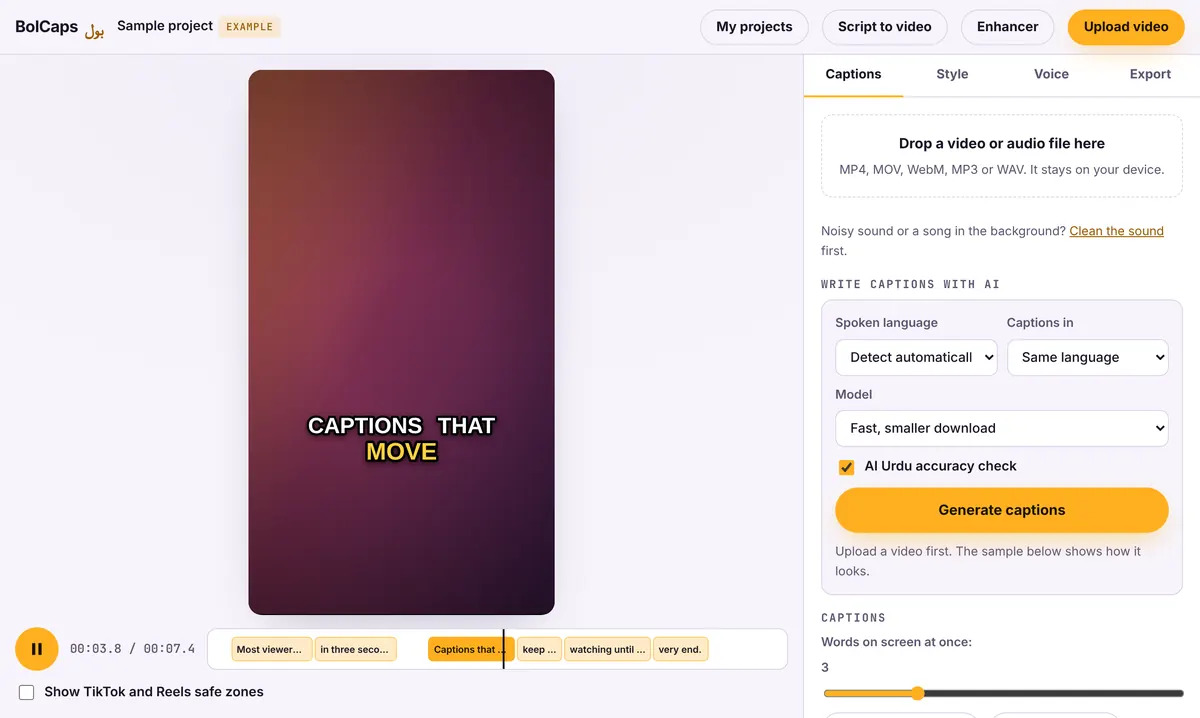
How to do it
- Open the Caption studio and add your video. Vertical 9:16, square and 16:9 all work.
- Pick the spoken language and press Generate captions. The AI times every single word.
- Open the Style tab and choose an animation: Pop, Karaoke, Highlight box, Bounce, Neon, Typewriter and more.
- Set how many words show at once. One to three words feels fast and punchy; five to seven reads like subtitles.
- Export an MP4 with the animated captions burned in.
The "Hormozi style" in one click
The most copied caption look on social media is big, heavy white words with a dark outline, two or three words at a time, with the current word in a bright color like yellow or green. It became famous through business creators such as Alex Hormozi, which is why people search for "Hormozi captions". In BolCaps, pick Pop or Highlight box, set 2 to 3 words on screen, and choose a yellow or green highlight. BolCaps is not connected to Alex Hormozi; this is simply the style people ask for by that name.
Which animation fits which video?
- Pop and Bounce: energetic talking-head clips, tips, hot takes.
- Karaoke and Highlight box: podcasts and interviews, where viewers read along.
- Typewriter: stories, quotes and slow, dramatic moments.
- Neon and Gradient: gaming, music and night-time aesthetics.
- Subtitle: calm tutorials and long YouTube videos where flashy text would distract.
Make the words land
Animation only works if the timing is right. After the AI writes the captions, play the video once and fix any word that is wrong or split badly. Put line breaks at natural pauses, keep emphasis words (numbers, names, "never", "free") on their own, and use one highlight color across your channel so viewers recognise your videos.
Keep captions inside the safe zone
TikTok, Reels and Shorts put buttons on the right and your caption, music and profile at the bottom. Keep the words in the middle of the screen, a little above center. The Caption studio has a Show TikTok and Reels safe zones box that draws those areas over your video, so you can see what will be covered before you export.
No watermark
Your video is exported clean. A small "Made with BolCaps" credit is on by default, and one tick box turns it off. You need a free account only when you download.
Frequently asked questions
Is the animated captions generator free?
Yes. All 60 animation styles and MP4 export are free, with no watermark. A free account is needed to download.
Can I change the font and colors?
Yes. Change the font, size, outline, shadow, highlight color and position for any style.
Can I get animated captions in After Effects or Premiere?
Yes. Export an After Effects script with editable text layers, a transparent caption overlay, or a green-screen MP4.
Does it work in other languages?
Yes. English, Spanish, Hindi, Urdu, Arabic and 90+ more languages, including right-to-left scripts.
Do I have to upload my video?
No. Only the sound is sent to write the captions, so the video stays on your device.
More free tools
Free auto caption generatorAdd captions to a TikTok videoYouTube Shorts subtitle generatorFree SRT subtitle generatorCaptions for podcast clipsReddit story video makerFaceless video makerFree AI voice generatorTranscribe audio to text, freeInstagram Reels caption generatorVideo to text converterBurn subtitles into a videoA free Submagic alternativeA free VEED alternativeFree Urdu caption generatorHindi subtitles for Reels, freeAdd subtitles to a video, freeUrdu audio to textHindi audio to textFree Urdu text to speechFree Hindi text to speechFree AI text to videoA free CapCut alternativeRemove background noise from a videoRemove music from a video, keep the voiceYouTube reused content checkerYouTube thumbnail testerFree photo enhancerBlur a face in a photo online