Free auto caption generator
Most social videos are watched with the sound off, so captions decide whether people keep watching. BolCaps listens to your video, writes every word with exact timing and lets you pick an animated style in one click. The AI runs in your browser, so your video is never uploaded to a server.
Caption my video free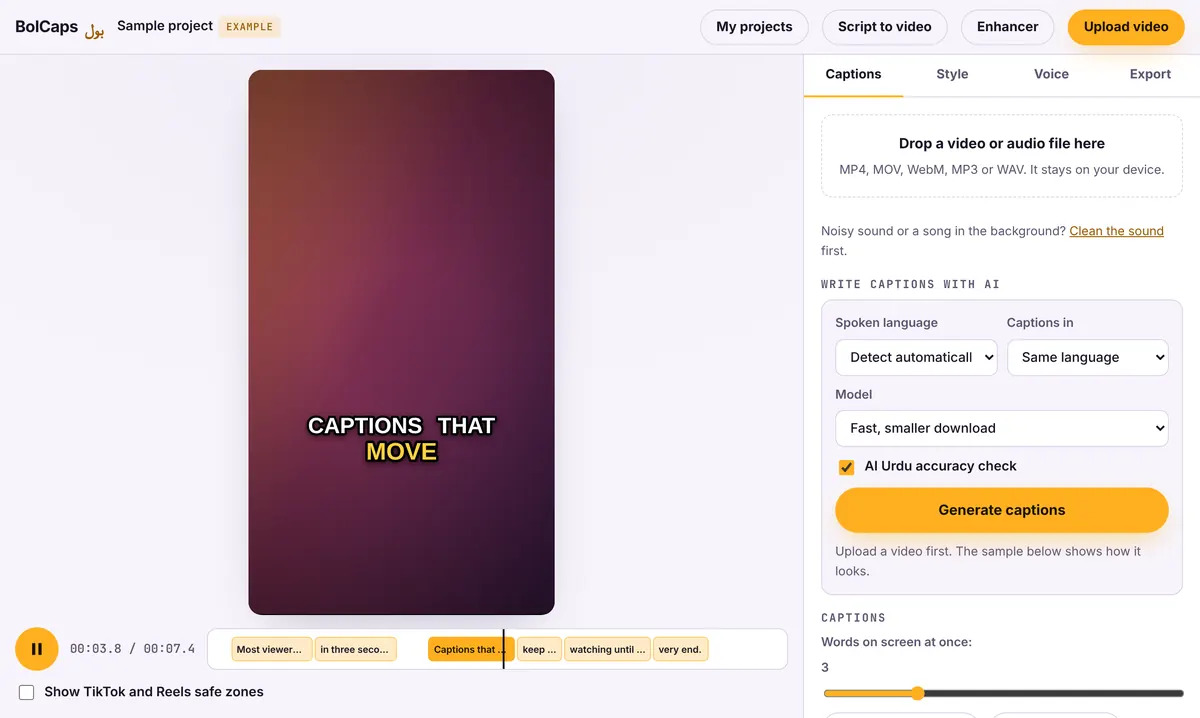
How to do it
- Open the Caption studio and drop in your video (MP4, MOV or WebM).
- Leave the language on English, or pick one of 90+ other languages.
- Wait a few seconds while the captions are written. Click any word to fix it.
- Pick one of 60 animated styles: word highlight, karaoke, bounce, outline and more.
- Export an MP4 with the captions burned in, or download an SRT or VTT file.
Why creators use auto captions
- Viewers on mute still follow the story, so watch time goes up.
- Captions make your video accessible to deaf and hard-of-hearing viewers.
- The words on screen help TikTok, Instagram and YouTube understand what your video is about.
No watermark
Your video is exported clean. A small "Made with BolCaps" credit is on by default, and one tick box turns it off. You need a free account only when you download.
Private by design
Most caption apps upload your video to their servers. BolCaps sends only the sound to its speech service (OpenAI Whisper, run by Groq or Cloudflare) and does not keep it, so the video itself stays with you.
How accurate are AI auto captions?
BolCaps uses OpenAI's Whisper speech model. On clear English speech it is usually close to word-perfect; accents, slang, names and loud music cause most mistakes. Choose the Accurate model for interviews or non-English speech, and read through once before you export. Every word can be clicked and fixed on the timeline.
Captions for every platform
- TikTok, Reels, Shorts: burn animated captions in and export 9:16.
- YouTube long videos: upload an SRT so viewers can switch captions on, and search can read them.
- LinkedIn and Facebook: burned-in captions, because most people scroll with sound off at work.
- Premiere Pro, After Effects, DaVinci Resolve: SRT, VTT, ASS, a transparent overlay or an After Effects script.
Keep captions inside the safe zone
TikTok, Reels and Shorts put buttons on the right and your caption, music and profile at the bottom. Keep the words in the middle of the screen, a little above center. The Caption studio has a Show TikTok and Reels safe zones box that draws those areas over your video, so you can see what will be covered before you export.
Frequently asked questions
Is the auto caption generator really free?
Yes. Captions, styles and exports are free. A free account is needed to download.
How accurate are the captions?
Clear English speech usually comes out nearly word-perfect. Fix any names or slang by clicking the word before you export.
Can I use it on my phone?
Yes, in Chrome or Safari. Videos longer than a few minutes finish faster on a laptop.
Can I edit the caption style?
Yes. Change the font, size, colors, position and how many words show at once.
Can it translate captions?
Yes. Speech in another language can be written as English captions. Choose English (translate) under Captions in.
More free tools
Add captions to a TikTok videoYouTube Shorts subtitle generatorFree SRT subtitle generatorCaptions for podcast clipsReddit story video makerFaceless video makerFree AI voice generatorTranscribe audio to text, freeAnimated captions generatorInstagram Reels caption generatorVideo to text converterBurn subtitles into a videoA free Submagic alternativeA free VEED alternativeFree Urdu caption generatorHindi subtitles for Reels, freeAdd subtitles to a video, freeUrdu audio to textHindi audio to textFree Urdu text to speechFree Hindi text to speechFree AI text to videoA free CapCut alternativeRemove background noise from a videoRemove music from a video, keep the voiceYouTube reused content checkerYouTube thumbnail testerFree photo enhancerBlur a face in a photo online