Free faceless video maker
You don't need to show your face or record your voice to run a YouTube or TikTok channel. Write a script, and BolCaps turns it into a video with a natural AI voice, matching visuals for each line and animated captions, all in your browser.
Make a faceless video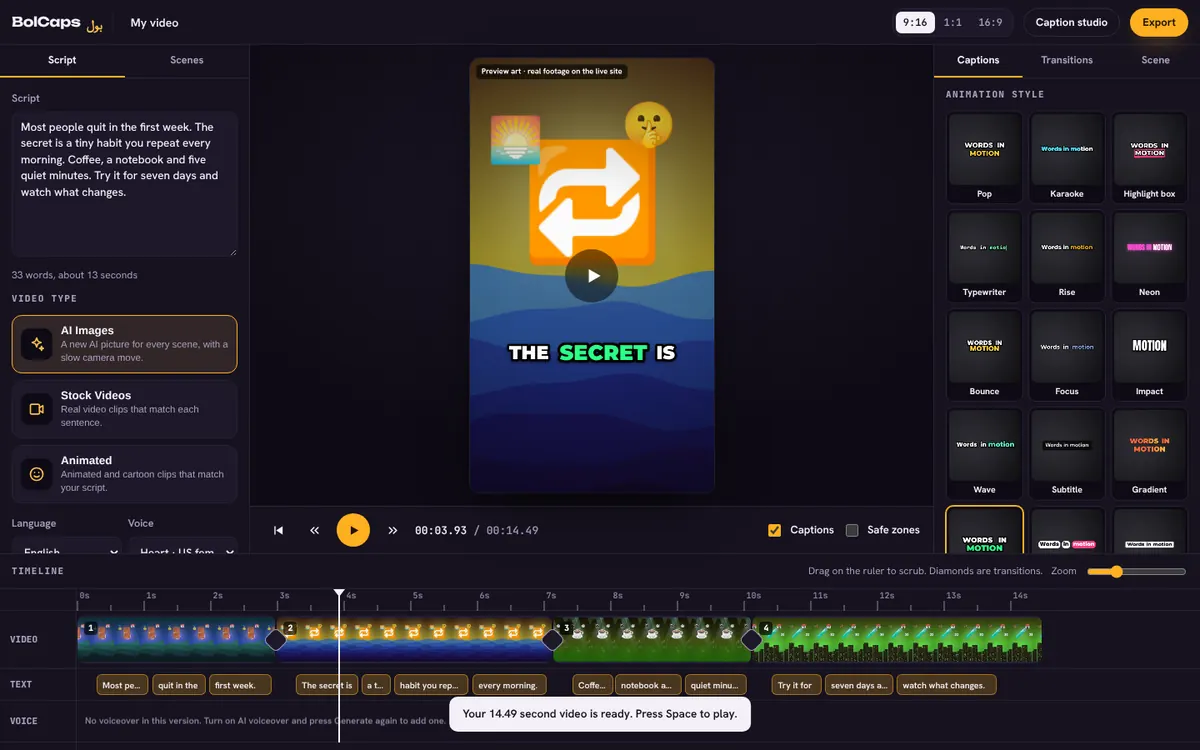
How to do it
- Open the Script to video editor.
- Write or paste your script. Short, clear sentences work best.
- Pick a voice and a look: AI pictures, stock videos or explainer animations.
- Press Generate video, then swap any scene, change the music or edit the captions.
- Export an MP4 for YouTube, TikTok, Reels or Shorts.
Faceless niches that work
- Facts, history and science explainers
- Story time, Reddit stories and true crime
- Motivation and quotes
- Top 10 lists and product roundups
- Tutorials over screen recordings
Make it count for monetization
YouTube pays channels that add real value. Write your own scripts, add your own opinions and edit the scenes. Run the free reused content check before you upload to see if anything looks risky.
Limits, honestly
Script to video is free for up to 6 minutes of video per person per day. It builds videos from pictures and clips with motion, not fully AI-generated footage.
A faceless workflow that takes 20 minutes
- Pick a narrow topic you can make 30 videos about.
- Write a 120 to 180 word script with a hook in the first line.
- Paste it into the Script to video editor and pick a voice.
- Swap any visual that does not match, and add your own clips if you have them.
- Run the monetization check, export and post at the same time every day.
Voice: AI or your own?
AI voices are fast and consistent. Your own voice builds trust and is more clearly original. A good middle ground is to record your voice on your phone, clean it with the free sound cleaner and let BolCaps caption it.
Frequently asked questions
Is the faceless video maker free?
Yes, for up to 6 minutes of video a day, with no watermark.
Can I use my own voice instead?
Yes. Record or import your voice in the Audio tab, and BolCaps captions it.
What sizes can I export?
9:16 for Shorts, TikTok and Reels, 16:9 for YouTube and 1:1 for feeds.
Do I need to install anything?
No. It runs in Chrome, Edge or Safari.
Can faceless channels be monetized?
Yes, if the videos are original and add value. Mass-produced, repetitive videos are not eligible under YouTube's policies.
More free tools
Free auto caption generatorAdd captions to a TikTok videoYouTube Shorts subtitle generatorFree SRT subtitle generatorCaptions for podcast clipsReddit story video makerFree AI voice generatorTranscribe audio to text, freeAnimated captions generatorInstagram Reels caption generatorVideo to text converterBurn subtitles into a videoA free Submagic alternativeA free VEED alternativeFree Urdu caption generatorHindi subtitles for Reels, freeAdd subtitles to a video, freeUrdu audio to textHindi audio to textFree Urdu text to speechFree Hindi text to speechFree AI text to videoA free CapCut alternativeRemove background noise from a videoRemove music from a video, keep the voiceYouTube reused content checkerYouTube thumbnail testerFree photo enhancerBlur a face in a photo online