YouTube Shorts subtitle generator
Shorts move fast, and viewers swipe away in the first two seconds if they can't tell what is going on. Animated subtitles keep their eyes on the screen. BolCaps writes them for you, times every word and exports a vertical MP4 that is ready to upload.
Make subtitles for my Short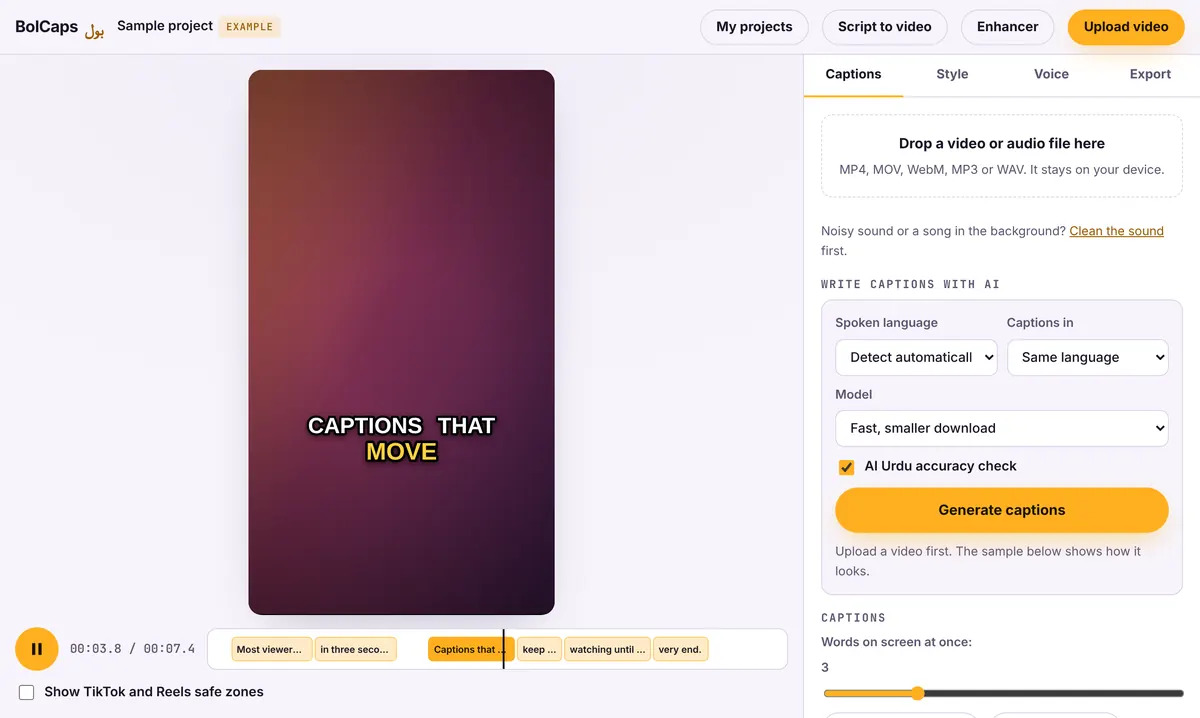
How to do it
- Open the Caption studio and add your Short (vertical 9:16, up to 3 minutes).
- Let the AI write the subtitles in English or another language.
- Fix any word, then pick an animated style and color.
- Export the MP4 and upload it to YouTube Shorts.
Turn a long video into Shorts
Have a long podcast or video? The BolCaps editor can find the best moments, cut them into vertical clips and caption them in one go. Open the editor and choose Long video to Shorts.
Burned-in or uploaded subtitles?
For Shorts, burn the captions into the video: YouTube does not show a captions button on most Shorts. For long videos, upload an SRT file so viewers can turn captions on or off.
No watermark
Your video is exported clean. A small "Made with BolCaps" credit is on by default, and one tick box turns it off. You need a free account only when you download.
Shorts subtitles that keep people watching
- Keep each subtitle to 1 to 4 words so it can be read in a glance.
- Place them in the center or slightly above; the channel name and title cover the bottom.
- Use one highlight color for key words, and keep it the same across your channel.
- Fix every mistake: a wrong word on screen makes people comment about the typo instead of your content.
Shorts and monetization
Shorts made from other people's clips or plain AI slideshows often earn nothing under YouTube's reused content rules. Original footage, your own voice or commentary and real editing help. The free monetization checker gives a quick read before you upload.
Frequently asked questions
Is it free?
Yes. Making and exporting subtitled Shorts is free.
Do captions help Shorts get more views?
Captions help people understand the video with sound off, which helps them keep watching. Watch time is one of the main signals YouTube uses.
Can I make subtitles in Spanish or other languages?
Yes. Pick from 90+ languages before the captions are written.
Is my video uploaded to BolCaps?
No. The video stays on your device; only its sound is sent to write the subtitles.
What length should a Short be?
YouTube allows Shorts up to 3 minutes. Most well-performing Shorts are 20 to 60 seconds.
More free tools
Free auto caption generatorAdd captions to a TikTok videoFree SRT subtitle generatorCaptions for podcast clipsReddit story video makerFaceless video makerFree AI voice generatorTranscribe audio to text, freeAnimated captions generatorInstagram Reels caption generatorVideo to text converterBurn subtitles into a videoA free Submagic alternativeA free VEED alternativeFree Urdu caption generatorHindi subtitles for Reels, freeAdd subtitles to a video, freeUrdu audio to textHindi audio to textFree Urdu text to speechFree Hindi text to speechFree AI text to videoA free CapCut alternativeRemove background noise from a videoRemove music from a video, keep the voiceYouTube reused content checkerYouTube thumbnail testerFree photo enhancerBlur a face in a photo online