Free closed caption generator
Closed captions are the captions a viewer can switch on and off with the CC button. They live in a separate file, usually SRT or VTT, that you upload next to your video on YouTube, Vimeo, a course platform or your own website. BolCaps writes that file for you: drop in the video, let the AI time every line, check it, and download it. It costs nothing and your video is not uploaded.
Make closed captions free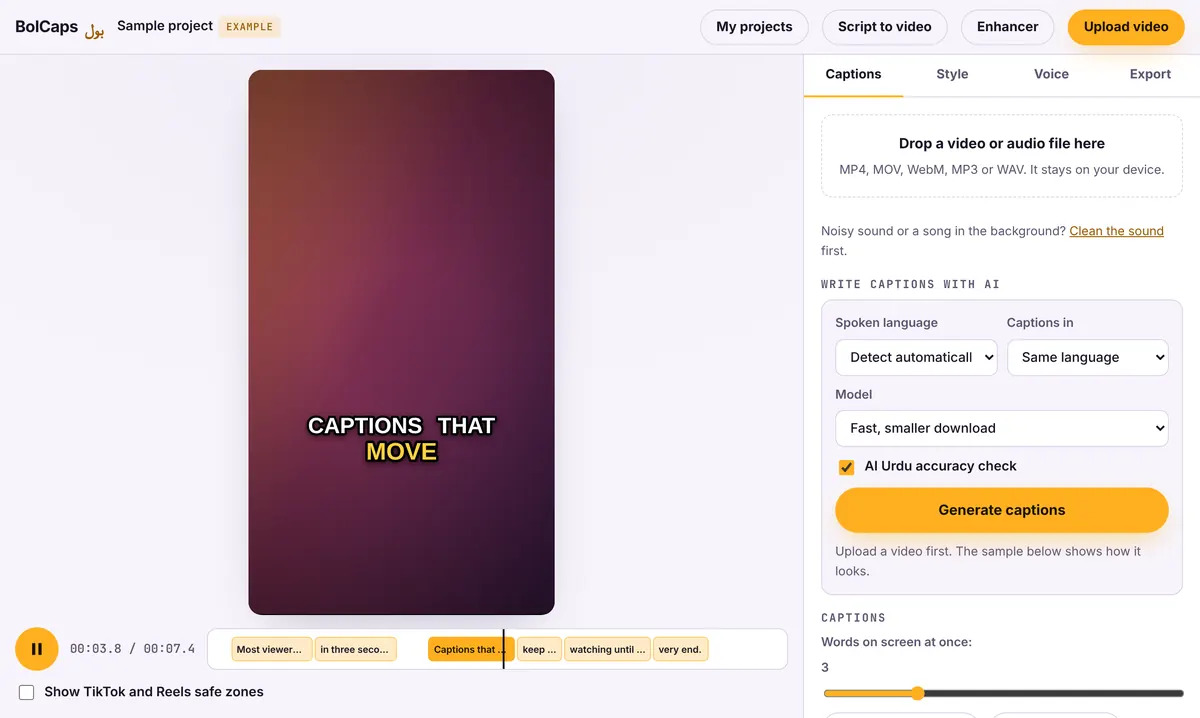
How to do it
- Open the Caption studio and add your video or audio file.
- Pick the spoken language and press Generate captions.
- Play it through once and fix names, numbers and any word the AI misheard.
- Add sound labels where they matter, for example [music] or [laughter].
- Open Export and download SRT (for YouTube, Vimeo, Facebook and most players) or VTT (for websites and HTML5 video).
Closed captions, open captions and subtitles
- Closed captions (CC): a separate file the viewer turns on. Searchable, editable later, and expected on YouTube, schools and company sites.
- Open captions: burned into the picture so they always show. Best for TikTok, Reels and ads. BolCaps does both from the same captions.
- Subtitles: often used for a translation of the speech, but in everyday use the words overlap.
What makes captions accessible
Good closed captions match what is said word for word, appear in time with the speech, stay on screen long enough to read, and mention important sounds such as music, a door slamming or a phone ringing. Keep lines to about 32 to 42 characters and no more than two lines at a time. Our caption accessibility checklist goes through each point.
Who needs closed captions
Teachers and professors posting lectures, companies sharing training and town-hall videos, churches and nonprofits streaming services, and creators who want deaf and hard-of-hearing viewers to follow along. Captions also help people watching in a second language and anyone in a quiet office or on a train.
Your video stays with you
Only the sound is sent to the speech service that writes the words (OpenAI Whisper, run by Groq or Cloudflare), and it is not kept. The video file itself never leaves your computer or phone, which matters for client work, classes and internal meetings.
Frequently asked questions
Is the closed caption generator free?
Yes. Writing, editing and downloading SRT or VTT files is free. You need a free account to download.
Will these captions make my video ADA or WCAG compliant?
Accurate, synchronized captions are a key part of meeting accessibility standards like WCAG, but compliance depends on your whole site and situation. Always review AI captions before you publish. This is not legal advice.
Which file should I upload to YouTube?
SRT works everywhere on YouTube. Upload it under Subtitles in YouTube Studio and pick the language.
Can I caption audio-only files?
Yes. MP3, M4A and WAV work, which is handy for podcasts that need a transcript.
Can I make captions in Spanish or French?
Yes. Pick the spoken language from 90+ options, or turn the speech into English captions.
More free tools
Free auto caption generatorAdd captions to a TikTok videoYouTube Shorts subtitle generatorFree SRT subtitle generatorCaptions for podcast clipsReddit story video makerFaceless video makerFree AI voice generatorTranscribe audio to text, freeAnimated captions generatorInstagram Reels caption generatorVideo to text converterBurn subtitles into a videoA free Submagic alternativeA free VEED alternativeSpanish subtitle generatorFrench subtitle generatorTranscribe a Zoom recordingLecture to text, freeCaptions for LinkedIn videosTurn a long video into ShortsAI voiceover for YouTube videosA free Opus Clip alternativeA free Descript alternativeA free Kapwing alternativeA free ElevenLabs alternativeFree Urdu caption generatorHindi subtitles for Reels, freeAdd subtitles to a video, freeUrdu audio to textHindi audio to textFree Urdu text to speechFree Hindi text to speechFree AI text to videoA free CapCut alternativeRemove background noise from a videoRemove music from a video, keep the voiceYouTube reused content checkerYouTube thumbnail testerFree photo enhancerBlur a face in a photo online