Auto reframe a video to vertical, free
A wide 16:9 video looks tiny on TikTok, Reels and Shorts, and a plain centre crop cuts people out when they move. BolCaps finds the speaker's face in every part of the video and moves the frame with them, smoothly, like a camera operator would. You get a vertical 9:16, square 1:1 or 4:5 video, ready for captions.
Reframe my video free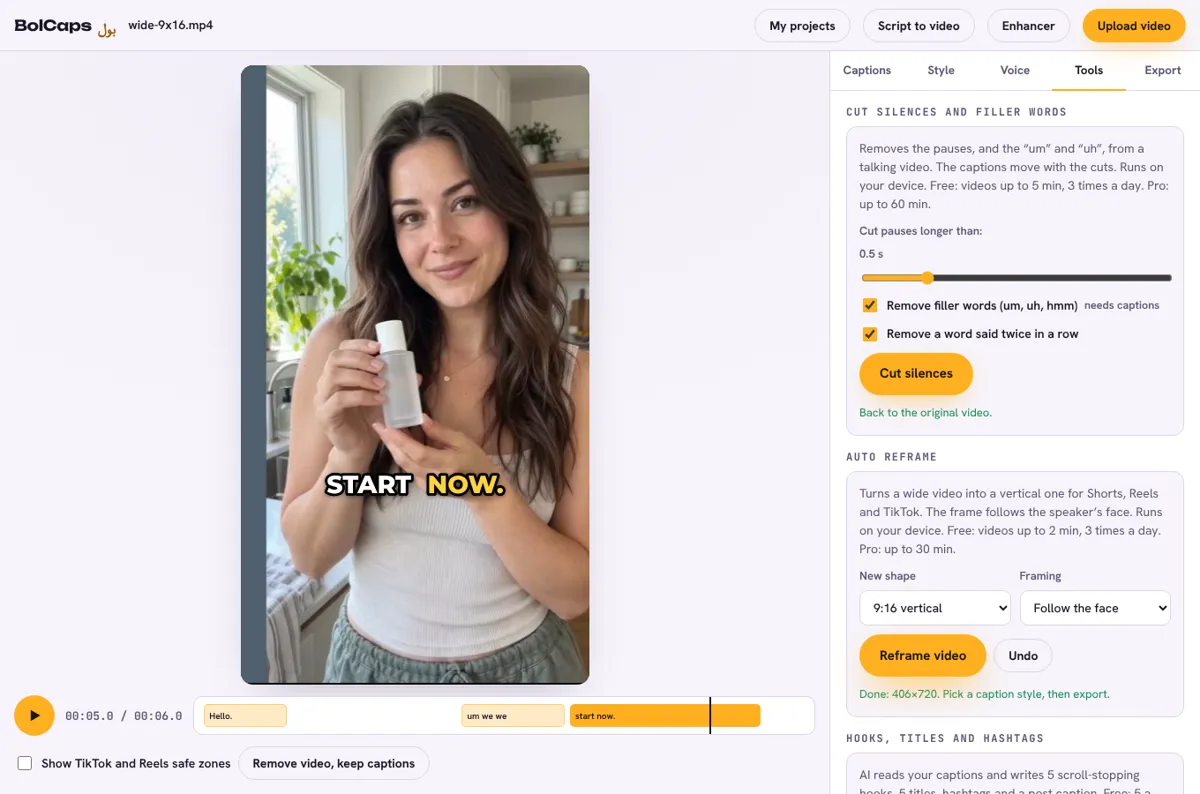
How to do it
- Open the Caption studio and add your wide video.
- In the Caption studio, open the Tools tab.
- Under Auto reframe, choose the new shape: 9:16 vertical, 1:1 square or 4:5 portrait.
- Keep Follow the face selected (or Keep the middle for videos without people).
- Press Reframe video. Press Undo if you want the original back.
- Add captions, pick a style and export the MP4.
How the frame follows the face
BolCaps looks for faces five times a second. It follows the biggest face, ignores small head movements so the picture does not wobble, pans smoothly when the person walks, and jumps straight to the new position when the shot changes. If no face is found, the middle of the video is kept.
Free and Pro
- Free: videos up to 2 minutes, 3 times a day.
- Pro: videos up to 30 minutes.
Runs on your device
The video is cut and rebuilt inside your browser, so it is not uploaded anywhere and there is no queue. A laptop is fastest; recent phones work too. Chrome, Edge, Safari and Firefox are supported.
Frequently asked questions
Is auto reframe free?
Yes. Free accounts can reframe videos up to 2 minutes long, 3 times a day. Pro takes videos up to 30 minutes.
Which shapes can I make?
9:16 for TikTok, Reels and Shorts, 1:1 square, 4:5 for Instagram feed posts, and 16:9 wide.
What if there are two people?
It follows the biggest face, and stays with the person it was following when both are about the same size.
Is the video uploaded?
No. Face finding and the new video are both made in your browser.
More free tools
Free auto caption generatorAdd captions to a TikTok videoYouTube Shorts subtitle generatorFree SRT subtitle generatorCaptions for podcast clipsReddit story video makerFaceless video makerFree AI voice generatorTranscribe audio to text, freeAnimated captions generatorInstagram Reels caption generatorVideo to text converterBurn subtitles into a videoA free Submagic alternativeA free VEED alternativeRemove silence from a videoRemove um and uh from a videoFree AI video dubbingTranslate an Urdu video to EnglishTikTok hook generatorYouTube title and hashtag generatorRemove a video backgroundMovie explainer (recap) video makerFree closed caption generatorSpanish subtitle generatorFrench subtitle generatorTranscribe a Zoom recordingLecture to text, freeCaptions for LinkedIn videosTurn a long video into ShortsAI voiceover for YouTube videosA free Opus Clip alternativeA free Descript alternativeA free Kapwing alternativeA free ElevenLabs alternativeFree Urdu caption generatorHindi subtitles for Reels, freeAdd subtitles to a video, freeUrdu audio to textHindi audio to textFree Urdu text to speechFree Hindi text to speechFree AI text to videoA free CapCut alternativeRemove background noise from a videoRemove music from a video, keep the voiceYouTube reused content checkerYouTube thumbnail testerFree photo enhancerBlur a face in a photo online