Movie explainer video maker: a whole movie in, a recap video out
Movie recap channels ("movie explained", "story explained") take hours of work per video: watching the film, writing the story, recording a voice-over and cutting the right shots. BolCaps does the heavy part for you. Choose a movie file and the AI watches and listens to it part by part, works out the plot, the characters and the twists, and writes a recap script in film order. You edit any word, then BolCaps records an AI voice-over and cuts short movie shots that match every sentence, with captions and music.
Explain a movie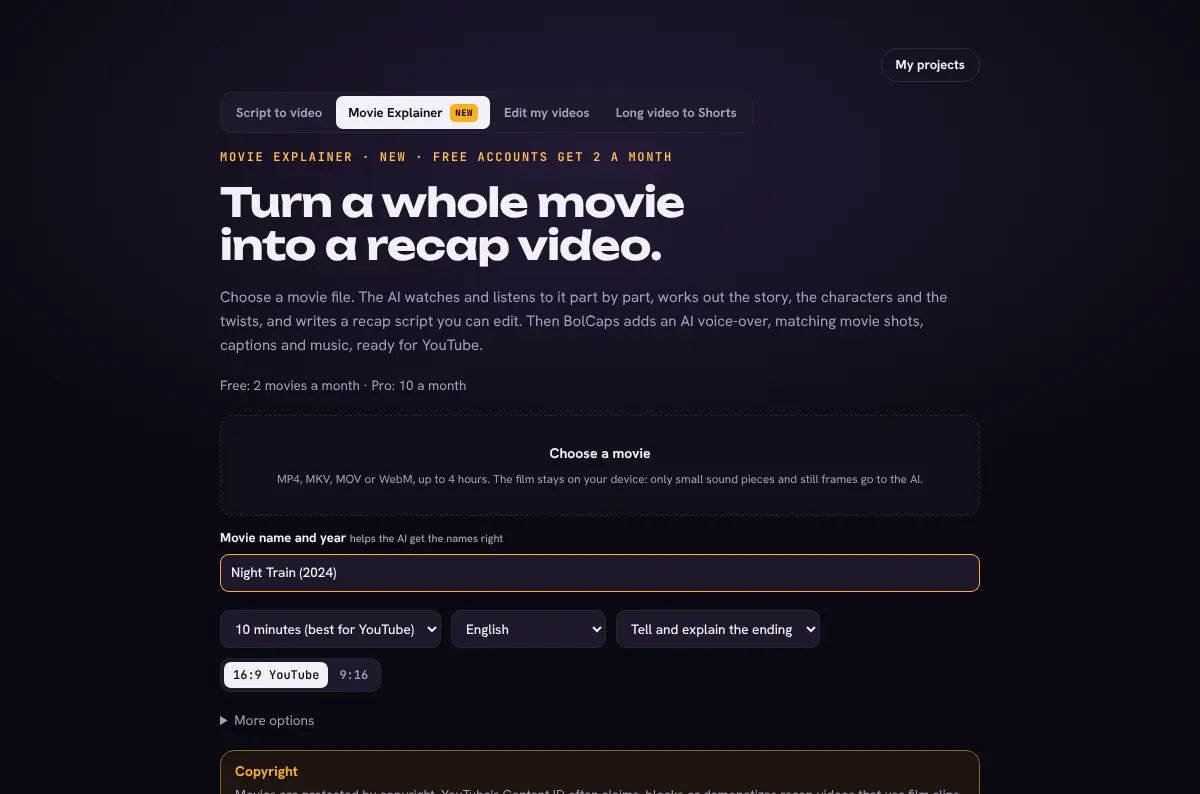
How to do it
- Open the video editor and choose Movie Explainer.
- Choose your movie file (MP4, MKV, MOV or WebM, up to 4 hours) and type its name and year.
- Pick the length (5 to 15 minutes), the voice-over language and whether to tell the ending.
- Read the copyright note, tick the box and press Understand the movie. The AI watches it part by part.
- Edit the recap script: words, part titles and the movie times each part shows.
- Press Make the video, then fine-tune shots in the editor, make a thumbnail and export the MP4.
How the AI understands a movie
The film stays on your device. BolCaps cuts it into parts of about 10 minutes and sends only each part's sound (a small compressed file) and a few small still frames to the AI. The AI writes notes of what happens and when, keeping the characters' names the same from part to part, then writes the recap from all the notes in story order.
What the video looks like
- An AI voice-over in English, Urdu, Hindi or 20 more languages
- Movie shots of 2.5 to 4 seconds taken from the part of the film each sentence talks about, with a slow zoom
- Animated captions, soft fades between parts and quiet cinematic music
- 16:9 for YouTube or 9:16 for Shorts and Reels
Free and Pro
- Free accounts: 2 movie explainers a month.
- Pro: 10 a month.
Editing, captions and MP4 export stay free, with no watermark.
Copyright
Films are protected by copyright, and YouTube's Content ID often claims, blocks or demonetizes recap videos that use movie clips. Tell the story in your own words, keep clips short, and only use films you are allowed to use. That responsibility stays with the creator.
Frequently asked questions
Is the movie uploaded?
No. The film is read in your browser. Only small sound pieces and small still frames of each part go to the AI, and the video is made on your device.
How long should a movie recap be?
Most successful recap channels post 8 to 15 minutes for a two hour film. BolCaps suggests 10 minutes and lets you choose 5 to 15.
Can I change the script?
Yes. Every word, part title and movie time can be changed before the video is made, and the AI can write it again.
How many movies can I explain for free?
Free accounts get 2 movie explainers a month. Pro members get 10.
Which languages can the voice-over use?
English, Urdu, Hindi, Arabic, Spanish, French, German and more: every language the BolCaps voices speak.
More free tools
Free auto caption generatorAdd captions to a TikTok videoYouTube Shorts subtitle generatorFree SRT subtitle generatorCaptions for podcast clipsReddit story video makerFaceless video makerFree AI voice generatorTranscribe audio to text, freeAnimated captions generatorInstagram Reels caption generatorVideo to text converterBurn subtitles into a videoA free Submagic alternativeA free VEED alternativeRemove silence from a videoRemove um and uh from a videoAuto reframe a video to verticalFree AI video dubbingTranslate an Urdu video to EnglishTikTok hook generatorYouTube title and hashtag generatorRemove a video backgroundFree closed caption generatorSpanish subtitle generatorFrench subtitle generatorTranscribe a Zoom recordingLecture to text, freeCaptions for LinkedIn videosTurn a long video into ShortsAI voiceover for YouTube videosA free Opus Clip alternativeA free Descript alternativeA free Kapwing alternativeA free ElevenLabs alternativeFree Urdu caption generatorHindi subtitles for Reels, freeAdd subtitles to a video, freeUrdu audio to textHindi audio to textFree Urdu text to speechFree Hindi text to speechFree AI text to videoA free CapCut alternativeRemove background noise from a videoRemove music from a video, keep the voiceYouTube reused content checkerYouTube thumbnail testerFree photo enhancerBlur a face in a photo online